

Last Updated on October 5, 2022 by Slideson
Ever needed to convert font or icon font in to a shape? In this article I’ll show you how simple it is to convert any font in to a shape. What’s the benefit? If someone else needs to edit the template they don’t need to install the icon font. You can also combine the new shapes you’ve created and get creative and why not to turn the custom shape in to a custom placeholder.
Step 1 – Select the character
Add a text box and select the icon you want to turn in to a shape. For example to add a Font Awesome icon, add a text box, go to the Insert tab and select Symbol. On that window, select Font Awesome from the dropdown and select your icon and click Insert.
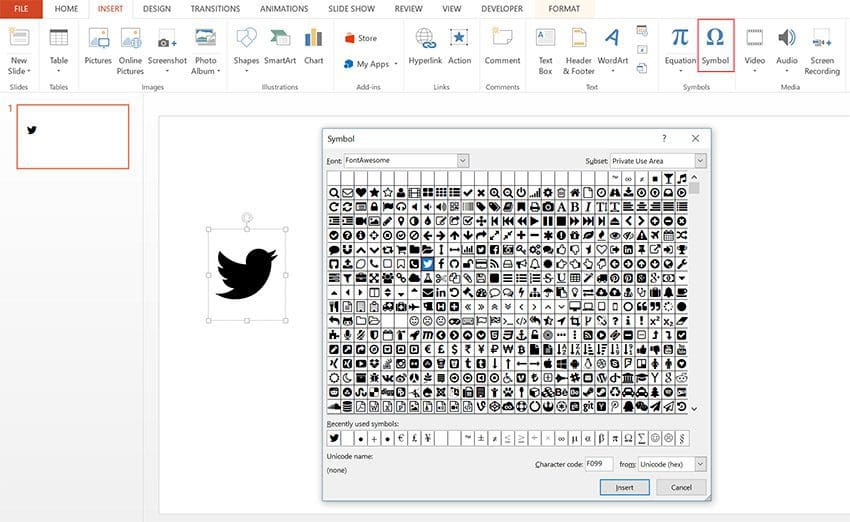
Step 2 – Add rectangle
Draw a rectangle shape that covers the icon, remove the outline. Send the rectange to the back (right click the rectangle and select Send Back).

Step 3 – Merge shapes
Select both of the elements, go to Format tab -> Merge Shapes -> Intersect. There you go, your icons is ready.

Simple and easy. You can use the other merge option to create other creative shapes. Did you know that all Slideson presentation templates come with hundreds of icons that are fully editable in PowerPoint?
Here are some free fonts for your inspiration:




Some Creative Slides by Slideson


Free professional PowerPoint and Google Slides presentation templates. Boost your presentations with Slideson! Want to write for us? Become a contributor.
Related Articles
Import and Export Custom Shapes as EMF Files
How to Add and Edit Charts in Google Slides
How to Use Adobe Illustrator Shapes in PowerPoint
A Comprehensive Guide to Creating a Marketing Presentation
How to Create a Label With Arched Text in PowerPoint
How to Prepare an Annual Report for Your Business
How Public Speaking Skills Can Fuel Your Business Growth
10 Essential Pitch Deck Tips
Free Presentation Templates
Marketing Plan Template
Business Presentation Template
Portfolio PowerPoint Template
Company Profile PowerPoint Template
Pitch Deck PowerPoint Template
Gradient PowerPoint Template
Startup Pitch Deck
Device Mockups for PowerPoint
Project Planning PowerPoint Template